Category: Web Dev Journal

John Gamboa – Web Development Training Journal

  • Collections: Working with Hashes in Ruby

    Collections: Working with Hashes in Ruby

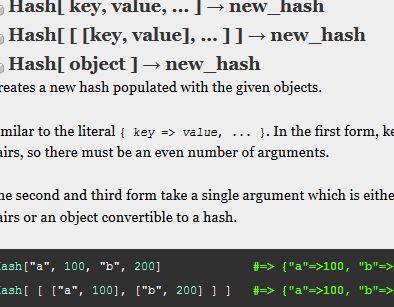
    Hashes are data structures that contain key => value pairs and are denoted by curly braces {}

    hash = {:key => value}  # old syntax
    hash = {key: value} #new syntax

    They can have multiple key value pairs.

    hash = {:key1 => value1, :key2 => value2, :key3 => value3}

    To add onto a hash:

    hash[:key4] = value4
    hash[:key5] = value5
    hash   
    # => {:key1 => value1, :key2 => value2, 
          :key3 => value3, :key4 => value4, :key5 => value5}

    To delete a key and its value:

    hash.delete(:key1)
    hash = {:key2 => value2, :key3 => value3, :key4 => value4, :key5 => value5}

    To retrieve a value of a specific key:

    hash[:key5] 
    # => value5

    hash.merge(other_hash) merges hash with other_hash and creates another hash.

    hash.merge!(other_hash) is a mutating version that modifies the calling hash object.

    Iterate with .each method

    hash.each { |key, value| puts #{key} #{value} }


  • Collections: Working with Arrays in Ruby

    Collections: Working with Arrays in Ruby

    DISCLAIMER: I’m a noob to programming. This is not a guide or something that you should use to learn how to be a programmer. Some of it might be incorrect. This is just for me, John Gamboa, to record my progress in learning Ruby. Now that’s out of the way, on the to the article.

    This is an array for a refresh:

    array = [1, 2, 3, 3, 4, 5, 5]

    Looking for something?

    array.first   # returns the first element
                  # => 1
    array.last    # returns the last element
                  # => 5
    array[4]      # returns the element in that index (index starts at 0)
                  # => 4

    Looking for a change? These methods will change the array.

    array.pop       # removes last element and mutates
    array.push      # add element to the end and it mutates
    array << object # "shovel" is the same as push and it mutates

    More changes coming.

    array.map       # iterates over each element, applies block, returns new array
    array.delete_at # deletes value at an index and mutates
    array.delete    # deletes all instances of a value and mutates
    array.uniq      # returns a new array of all unique values, doesn't mutate
    array.uniq!     # mutates array, only unique values are left.

    Let me re-iterate with “each” and “select”:

    The “each” method iterates through each element of an array (we are still talking arrays here) and applies a block of code to each element.

    The “select” method is similar in that it loops through each element but it returns a new array and that new array includes elements that return true to the expression provided. If the return is nil or falsey, then nothing is entered into the array for that element.

    select – returns a new array based on the block’s return value. If the return value evaluates to “true” (or checks if it’s truthy) then the element is selected.

    Common array methods

    array.include?(value) checks if value is in the array.

    array.flatten takes an array with nested arrays and turns it into a one-dimensional array.

    array.flatten! is flatten that mutates

    array.each_index iterates through the index and passes the index of each element into the block.

    array.each_with_index iterates through the array passes two parameters into the block, value and index.

    array.sort returns a sorted array.

    array.product(array2) combines two arrays like this:

    [1, 2, 3].product([6, 7]) # => [[1, 6], [1, 7], [2, 6], [2, 7], [3, 6], [3, 7]]

    each vs map: use each for iteration and it returns the original array, use map for transformation returns a new array

    map – returns a new array based on the block’s return value. Each element is transformed based on the return value.
  • Changing Objects Passed Into Methods – Ruby

    Changing Objects Passed Into Methods – Ruby

    When a variable is passed into a method, it may or may not be changed based on the operation that takes place inside the method.

    For example:

    def no_mutation(str)
      str + ", John?
    end
    
    words = "How are you"
    no_mutation(words)
    
    puts words    # => "How are you"

    Notice how the “+” operator doesn’t change or mutate the “words” variable? That’s because “+” is not destructive. It concatenates “How are you” and “, John?” but that complete string isn’t assigned to anything nor the original object “How are you” changed by the “+” operator. If the line were changed to str = str + “, John?”, the str variable would then point to a new string object “How are you, John?” but it would not change the original string object that was passed into the method.

    Now let’s look at the following code.

    def mutation(str)
      str << ", John?
    end
    
    words = "How are you"
    mutation(words)
    
    puts words    # => "How are you, John?"

    This time string object that “words” points to is changed by the method. That’s because the << in the method is destructive and mutates the object that is referenced by the variable.

    Conclusion:

    Depending on the operation going on in the method, the object passed in may or may not be changed. It’s a good reason to use irb to test your code and see what is happening to the objects in your methods.

  • Local Variable Scoping Rules in Ruby- Part Two

    Local Variable Scoping Rules in Ruby- Part Two

    Continuing on the topic of local variable scoping rules, we come to the scoping rules for methods.

    Check this code:

    a = 5
    
    def some_method
      a = 3
    end
    
    puts a # => 5 (Why 5 and not 3?

    When the code executes “puts a”, it displays 5 and not 3. The reason is our 2nd rule.

    Rule #2 – Methods create their own scope outside of execution flow.

    We’ll visit methods a little more later in the blog.

    Blocks and Nests

    Rule #3 – A block creates a new scope for local variables, nested blocks created nested scopes, and the scope of a variable is determined by where it is initiated.

    Let’s take a look at the following code for illustration.

    2.times do
      a = 'hello' # a is initialized inside the 2.times block.
      puts a
    end
    
    loop do
      puts a     # => uh oh NameError
      break
    end
    
    puts a      # => man! another NameError

    The variable “a” is initialized in the first block and therefore can’t be accessed the second block or the last “puts a” line. That also means that peer blocks cannot access variables initialized in other blocks. Which also then means we could reuse “a” for another variable in the second block. We really shouldn’t use letters for variable names since they should be a lot more descriptive.

    Nested blocks create nested scopes. If you initiate a variable outside of any blocks it will be accessible by blocks and inner blocks. If a variable is initiated in a block it is accessible by blocks created inside the block it was created in. Confused? I guess this concept is better served with actual code.

    a = 1            # first level variable accessible by blocks and nested blocks
    
    loop do
      b = 2          # second level variable
    
      loop do
        c = 3        # third level not accessible to first or second level
        puts a       # => 1
        puts b       # => 2
        puts c       # => 3
        break
      end
      
      puts a         # => 1
      puts b         # => 2
      puts c         # => NameError because c is on 3rd level
      break
    end
    
    puts a          # => 1
    puts b          # => NameError because b is on 2nd level
    puts c          # => NameError because c is on 3rd level
    

    Variable Shadowing

    Basically if you have an outer variable and an inner variable with the same name, you prevent the outer variable from being modified by the code where the inner variable exists.

    n = 10
    [1, 2, 3].each do |n|
      puts n    # will use the block 'n' and ignore the outer scoped 'n'
    end
    n = 10
    1.times do |n|
      n = 11
    end
    puts n    # => 10 because the outer scope 'n' isn't changed

    Rule #4 – The simplest way to avoid variable shadowing is to use descriptive variable names.

    Variables and Methods

    In contrast to blocks that leak from outer to inner blocks, methods are self contained.

    a = 'hello'
    
    def some_method
      puts a
    end
    
    # invoke the method
    some_method     # => NameError because puts can't access 'a'
      
      def some_method(a)
        puts a
      end
    
      some_method(5)   # => 5

    Rule #5 – Variables can’t leak into a method from outside the method, they have to be passed in explicitly.

    Blocks Within Methods

    Rule #6 – The rules of block scope remain in full effect inside of a method.

    Constants

      USERNAME = 'Boss'
    
      def welcome
       puts "Welcome, #{USERNAME}!"  end
    
      welcome     # => Welcome, Boss!

    Rule #7 – Constants are accessible by methods and can be initiated in an inner scope.

  • Local Variable Scoping Rules in Ruby – Part One

    DISCLAIMER: At the time of this post, I, John Gamboa, was not a Ruby or programming expert. A total noob and I wrote this more to familiarize myself with the rules than anything else. What flows through sticks to you.

    A scope of a local variable determines if it is accessible or not. For instance, if you were to code this:

    var1 = 1
    loop do
      puts var1
      var1 = var1 + 1
      break
    end
    puts var1

    Run the code and you’ll find that the last line “puts var1” results in 2 being displayed. Why? Because the variable var1 in the first line is accessible and there can be modified by the loop block.

    Rule #1 – Outer scope variables are accessible by the inner scope.

    But what about block of code? What does the last line produce?

    array = [6, 5, 4]
    for i in array do
      var1 = 5
    end
    puts var1

    It produces 5. Even though var1 was initiated inside the do/end block, var1 is accessible outside it. For a variable to be inaccessible in a do/end block, the do/end block needs to immediately follow a method invocation. “for” in the code above is not a method invocation, in contrast to the following code:

    loop do
      var1 = 1
      puts var1
      var1 = var1 + 1
      break
    end
    puts var1

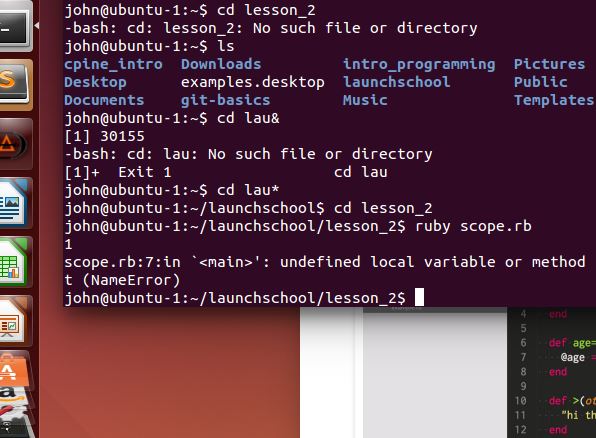
    Since “loop” is a method invocation, the do/end loop following it creates a new block which prevents var1 from being accessed by “puts” in the last line. It results in an error with “undefined local variable or method…” in it. That’s because var1 was initialized inside the loop block, or in the inner scope, and the “puts var1” is outside the block and can’t access var1.

    Which means…

    Inner scope variables are NOT accessible outside of the block

  • First Web Dev Journal Entry

    First Web Dev Journal Entry

    So for the last few weeks I’ve been learning a web programming language called Ruby at launchschool.com. I decided to delve into web programming because it is a growing industry with lots of demand for skilled developers. With the advent of iPhone and the whole smartphone, mobile, slash always-connected phenomena, demand for web developers and software engineers has skyrocketed and with my background in IT, I figured I’d give it a go and maybe in a couple years be able to add software programming and web development to my repertoire of computer related skills.

    Many years ago, I took a class in Visual Basic 6 at a local community college and did fairly well but it was super basic. I had no need for my job at the time nor was I looking to get into programming but I thought it would be good to learn. Not having to use the knowledge I learned back then, needless to say, I knew almost nothing coming into learning and had zero background when I decided to seriously study web development.

    After a few weeks, I’m enjoying the process of learning again. I am always challenged by subject matter, because it’s all new to me and it feels like my brain is getting a workout daily. At times my mind feels like mush and other times it feels empowered from having learned AND understood new concepts.

    The course encourages starting a blog and so I started this blog as a part of my IT Experiences site. It’s related, right? So, why not? I’ll occasionally post some updates. Not sure what they’ll be about – technical, experiential, both, who knows? Keep checking back to see how I’m doing.

    My current plan is to finish the course that in 2 years I can say I have the skills to write a full-stack software program. Full-stack means front-end and back-end programming. Think front end as your smartphone and back-end as the servers in the cloud. What does it mean for me if I can complete this course successfully in 2 years? God only knows.Code